Access the handouts for the May 3, 2013 University of Tennessee Interprofessional Education Oral Health Conference by clicking the links below.
Contact Trimika Bowdre if you have difficulties accessing the handouts. Telephone: 901-448-6099.

Access the handouts for the May 3, 2013 University of Tennessee Interprofessional Education Oral Health Conference by clicking the links below.
Contact Trimika Bowdre if you have difficulties accessing the handouts. Telephone: 901-448-6099.
The American Association of Colleges of Nursing (AACN) sponsored this webinar, facilitated by Dr. Susan Taft of the Kent State University College of Nursing in Kent, OH. Taft co-authored “A Framework for Evaluating Class Size in Online Education” that was published in The Quarterly Review of Distance Education, 12(3), 2011, 181-197.
The bad news … there is NO one size fits all for determining optimal class sizes for online courses. The good news … there ARE guidelines for determining optimal class size.
Optimal class size is defined as healthy revenue generation PLUS desirable student learning outcomes.
Variables (factors) associated with workload in teaching online courses include:
Taft went on to review three educational frameworks that provide guidelines:
Class sizes on the objectivist-constructivist dimension:
Class sizes and Bloom’s Taxonomy dimensions:
The Community of Inquiry Model is the more complex of the three models. Three types of presence are recommended for online courses:
Using the objectivist-constructivist continuum + Bloom’s Taxonomy leads to a more objective and quicker determination of class size. When Community Of Inquiry model is considered, the complexity of judging appropriate class size increases.
Examples of class size determinations considering combinations of all 3 frameworks:
For courses, determine how much the faculty member needs to be present and in the center to help students learn. Much of this determination (80%) can be discerned from the syllabus (as long as it’s a good syllabus). For the additional 20%, need to review online workload – are faculty facilitating good meaty discussions among the students, are faculty grading online discussions.
A truism – most faculty see their specific course as the highest intensity, requiring the highest workload level. In most cases, it is not true. So the administrator needs to review across all faculty. Develop guidelines for courses offered during this particular semester will have this many students allowed into them. Develop guidelines for different levels in the program. RN-BSN courses should have between 20-40 students in each section so that faculty can grade papers and give effective feedback to students.
Synchronous can add an additional level of teaching intensity – because faculty need command of the tools to make them work and because synchronous sessions tend to generate questions and issues that the faculty need to follow up on. Synchronous teaching should add in to the faculty workload.
Discussion of the Quality Matters Program – it is great for structure of a course, but it doesn’t address process and outcomes. The Sloan Consortium quality scorecard is a better model for online work, according to the presenter.
In addition to the presenter’s article (referred to above) some accessible online resources related to determining optimal class size in online education are:
REMINDER: UTHSC is an institutional member of the Sloan Consortium, which enables faculty and staff to obtain important and relevant materials related to online education. Contact Cindy Russell for details.
For follow-up material or discussions related to this or other topics, contact Cindy Russell at crussell@uthsc.edu or 901-448-6158.
The Turning Technologies audience response system allows UTHSC instructors to pose a variety of questions to students and receive immediate feedback. With this fall’s introduction of ResponseWare, technology that allows students to use their smart phones, tablets, and other mobile devices as audience response tools, instructors are no longer limited to multiple choice and true/false questions. ResponseWare allows students to answer fill-in-the-blank, free-answer, and essay questions with ease.
For more information about Turning Technologies and ResponseWare, contact Tonya Brown at tlbrown@uthsc.edu or 901-448-5902.
NOTE: Plan to attend the Intro to Prezi session scheduled for Monday, Feb. 13, 2012, from 2-3pm in GEB A302. You’ll hear from Constance Tucker, Educational Coordinator in Student Academic Support Services, Richard Magid, Vice President of the University of Tennessee Research Foundation, and Paul Stumpf, Professor, Program Director & Chair of Obstetrics & Gynecology at Chattanooga, about their use of Prezi. They’ll do a show and tell of what they’ve done, what worked well, what didn’t work as well as hoped for, and their recommendations for use.
When used correctly, PowerPoint can be a fine addition to a presentation. Most of us, though, have experienced Death by PowerPoint. This is a painful and annoying experience!
Enter a relatively new Web 2.0 tool that’s a cross between slides and a whiteboard: Prezi.
Prezi aims to make sharing ideas more interesting. Curiosity is a goal. That could be a very positive thing!
Features of Prezi include:
But, is Prezi really useful for doing anything but fancy zooms and offering people the opportunity to skip around in a presentation? Here’s a recent blog post that illustrates the use of Prezi in conveying mathematical ideas and describes some principles for the use of Prezi.
Prezi examples you might find of interest:
Some detailed “how to” sites to get you up and running on Prezi a bit faster with less frustration – from various sources.
When you are welcomed to Prezi after subscribing, their introductory email has lots of great resources, including learning how to make a great Prezi by the company’s co-founder; exploring what other Prezi users are making; support manual; and support channels.
Prezi offers a free webinar every Thursday at 11am CST. Register here to receive details.
Prezi U is Prezi’s educational community. Join that community to learn and share best practices using Prezi in education, meet other educators, see top University Prezis and more.
Other links of interest:
Make plans to join colleagues on Monday, Feb. 13, 2012 from 2-3pm in GEB A302 for an Introduction to Prezi session that will increase your knowledge about Prezi and help you make an informed decision as to using Prezi in your future PREZIntations!
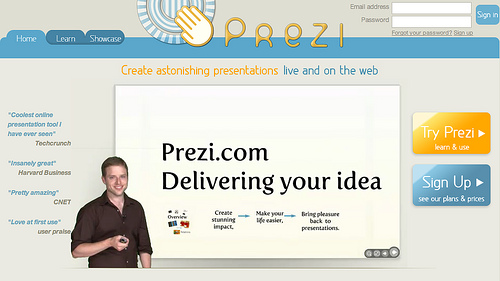
Image Attribution: Image from flickr, uploaded by Edd Dumbill with a Creative Commons Attribution-NonCommercial-ShareAlike 2.0 Generic license. Downloaded by Cynthia Russell on 20120208.
 UTHSC's Teaching & Learning Center