Use of Simulation in the Classroom – Video

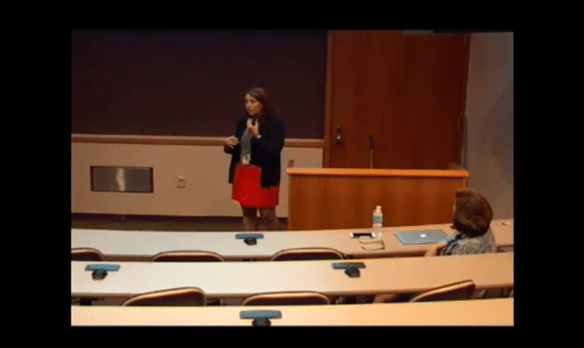
Click the video below to watch Dr. Chasity Shelton, College of Pharmacy provide an overview of the UTHSC Sim Center and discuss best practices in simulation education.

The below presentation was held Friday, July 8, 2016 as part of the Teaching & Learning Center’s ongoing series of monthly sessions to provide faculty with knowledge of all aspects of educational simulation implementation.

Screen Shot 2016-07-14 at 8.34.04 AM

Watch the Blackboard Conference Live and FREE

Thursday, July 14, 2016, The BbWorld Conference will offer their sessions online for free. There will be eight different sessions broadcast live over the course of the day themed around Digital Learning in Higher Education.

Sessions of note include:

Rocket session: great teaching in a world of connected students. 10:30AM CDT – This block will supercharge the TED talk format offering 7-minute sessions that pack a punch on topics including “Engaging Your Students Via Text Message,” “Integrating Video into Your Courses,” and “Social Presence in Online Learning.” Continue reading

Online Learning – Special Issue on Blended Learning in the Health Sciences

This special edition of Online Learning, the official journal of the Online Learning Consortium, reveals how blended learning is being developed at The George Washington University School of Medicine and Health Sciences (GW SMHS) in disciplines heavily reliant upon traditional, face-to-face models of teaching and learning.

Educators at this institution share knowledge of their efforts to respond to challenges to education in the health professions by encouraging adoption of technology-enhanced and blended models of delivery that support pedadgoical goals such as active learning, collaboration, reflective practice, and higher-order thinking. The series of articles in this issue consider the need for better integration of technology in the education of healthcare professionals and presents the sustained and coordinated efforts of one institution to promote integration of online technology into face-to-face courses.

To view this issue of Online Learning (available as a free PDF file download) please go to: http://onlinelearningconsortium.org/jaln_full_issue/volume-18-issue-4-november-2014/


Screen Shot 2014-12-01 at 10.58.06 AM


Where Can I Find Flippable Moments in My Classes? – Magna 20 minute mentor

Overview:

Spend 20 minutes on Where Can I Find Flippable Moments in My Classes? and you’ll discover flipping insights and strategies you can employ in any lesson in any course. Barbie Honeycutt and Sarah Warren ensure that after participating in this program, every participant can:

•    Define the flip using Bloom’s Taxonomy
•    Recognize a flippable moment in any class
•    Identify three places to look for a flippable moment in any course
•    Know when to flip and when to skip

To help you decide when to flip and when to skip, the presenters will share their own experiences of what they’ve tried, what worked, and what didn’t. These tales from the trenches will help you see the parallels to your own courses so that you can integrate flipping for greater success.

Information related to accessing the recording and materials for this session is located in the Professional Development course within Blackboard. Enrollment instructions for the Professional Development course can be found at: http://tinyurl.com/profdevenroll

Writing Better Multiple-Choice Questions (Magna Online Seminar)

Date: November 4, 2014
Time: 1:00 PM – 2:00 PM
Location: GEB A204
Click here to register: http://bit.ly/WBMCQ-11-04-14 

Overview:

Join us for Writing Better Multiple-Choice Questions, a new Magna Online Seminar developed and presented by Jim Sibley, director of the Centre for Instructional Support at the Faculty of Applied Science at University of British Columbia. The presenter will guide you through the common question-writing pitfalls and instruct you in item analysis so you can examine the performance of your questions and determine how to refine them.

More specifically, you will learn how to:

•    Write better, more effective multiple-choice questions
•    Identify, analyze, and avoid common multiple-choice question pitfalls
•    Use Bloom’s taxonomy to more accurately target the cognitive level of multiple-choice questions
•    Apply item analysis to measure the effectiveness of multiple-choice questions

Read Jim Sibley’s article in Faculty Focus – 7 Mistakes to Avoid When Writing Multiple-Choice Questions

Note: We are obtaining a recording of this session and will have it to share approximately 2-3 weeks after the live session. Let Kristy know if you would be interested in viewing it.

Making a Good Virtual First Impression

Are you currently designing or redesigning an online course? If so, you’ve probably created a checklist of items to help guide you through the process of building the course. You may have already checked items off the list such as:

  • Course syllabus and course schedule created
  • Discussion forums setup
  • Content uploaded to course site

Seems like you’re well on your way to having your online course built. However, there is one very important component that you may not have yet thought about. How will you introduce yourself to your online students? During the first meeting of a face-to-face course, do you typically spend a few minutes greeting your students and introducing yourself? Many of us dedicate a little bit of time during our first class meeting of the semester to introductions and making that all important first impression. But, is this possible in an online course? Absolutely! Most laptop and desktop computers are equipped with webcams that make recording an introductory video for your online course simple and quick. 

Research statistics recently shared in an article in Campus Technology showed that introductions within an online course help students form stronger connections to their instructors. Many online students state that feeling connected to their instructor positively impacted their overall performance in the course and also led to higher overall ratings for the course.

So, fire up that webcam on your computer and start recording! You’re students can’t wait to meet you.

Have questions related to online teaching and learning? Contact Kristy Conger (kconger@uthsc.edu / 901-448-2253).

webcam


Image provided via Creative Commons copyright license and obtained from http://en.wikipedia.org/wiki/LifeCam#mediaviewer/File:Lifecam_vx-3000.jpg

Tips and Advice for Productive Online Discussions

We have focused on the use of online discussion forums in some of our recent blog posts. We began by discussing the use of online forums as an active learning strategy in online/hybrid courses. We followed up with a couple of posts that focused on striking the right balance of instructor participation within online course activities and ways of engaging students in these activities…particularly within online discussion forums. 

How engaged are students in your online or hybrid course discussion forums? Would some recommendations and tips from experienced online educators help to further enhance the value of online discussions in your course? Wiley Faculty Network recently hosted a webinar (Discussion Board Best Practices) in which several resources and recommendations were shared. Experienced online instructor, DeAnna Kirchen, shared tips and best practices for teaching online including specific strategies for effectively incorporating discussion forums including creating groups, grading/rubrics, and setting expectations.

Do you have any tips or suggestions for enhancing online discussion forums? Please share your thoughts or experiences in the comments section below.

online


Image from: https://flic.kr/p/bvwXaM


Can I do more to engage my students in online discussion forums?

We have dedicated a couple of our recent blog posts to active learning in the online classroom. One active learning strategy that we discussed implementing into the online classroom is the use of discussion boards. As mentioned in our February 24th post, well constructed questions that connect to course/learning objectives can facilitate engaged and purposeful discussion among the instructor and students. However, are you locked solely into a question-and-answer format within the discussion forum? Are there other types of activities that could be used within the online discussion forum setting that would effectively engage students as well as promote purposeful discussion?

In a recent Faculty Focus article written by Rob Kelly, activities that online instructors may not have previously considered to include as part of discussion forum activities (including role-play, debates, and web quests) are suggested as ways to engage students in a manner that moves past the simple read-and-respond level of engagement. Multimedia aspects can also be incorporated into online discussions such as allowing students to reply within discussion forums with a recorded audio or video response.

How about your online discussion forums? Have you tried any discussion activities in your online or hybrid courses that would help to move students to a higher level of engagement and interaction? Share your thoughts or experiences in the comments section below.

mac-keyboard

How much is too much?

In last week’s blog post, we discussed the use of online discussion forums as an active learning strategy. We reviewed a three-part blog series that focused on creating, facilitating, and grading online course discussions. The second post in that series dealt with facilitating online discussions. A question that many online instructors grapple with in terms of facilitating is…how much is too much when determining the instructor’s level of participation needed to effectively and efficiently manage online course discussions? Isn’t the goal of discussions to engage your students, encourage critical thinking, and motivate them to interact with one another? Does a high level of instructor interaction distract from this goal?

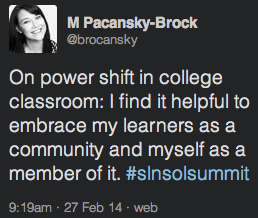
Tammy Stuart Perry and Samantha Streamer Veneruso address this question and others in an article written for Faculty Focus (Balancing Act: Managing Instructor Presence and Workload When Creating an Interactive Community of Learners). In this article, they discuss striking the right balance of instructor presence within the online course environment that will ultimately lead to higher levels of student interaction and engagement. In particular, they discuss shifting away from the “teacher centered” mindset to a “teacher as a facilitator” mindset.

What strategies are you using to balance instructor presence in your online or hybrid course activities?

Screen Shot 2014-02-27 at 10.42.08 AM

Active learning and online courses…can they work together?

We’ve shared several resources recently focusing on active learning strategies and activities for classes that meet face-to-face in a physical location. What about classes that don’t meet face-to-face or only meet a handful of times during a semester? Is it possible to incorporate active learning opportunities into fully online or hybrid courses?

The answer is…yes! One active learning strategy that can be very effective within an online course is the incorporation of discussions forums. Well constructed questions that connect to course/learning objectives can facilitate engaged and purposeful discussion among the instructor and students.

Check out the links below to view a three-part blog series (written by Debbie Morrison) focusing on online course discussions including ideas for creating, facilitating, and grading.

Post 1 – How to get students to participate in online discussions
http://onlinelearninginsights.wordpress.com/2012/06/22/how-to-get-students-to-participate-in-online-discussions/

Post 2 – How to facilitate robust online discussions
http://onlinelearninginsights.wordpress.com/2012/06/25/how-to-create-robust-discussions-online/

Post 3 – The methods and means to grading student participation in online discussions
http://onlinelearninginsights.wordpress.com/2012/06/28/the-methods-and-means-to-grading-student-participation-in-online-discussions/