Watch the Blackboard Conference Live and FREE

Thursday, July 14, 2016, The BbWorld Conference will offer their sessions online for free. There will be eight different sessions broadcast live over the course of the day themed around Digital Learning in Higher Education.

Sessions of note include:

Rocket session: great teaching in a world of connected students. 10:30AM CDT – This block will supercharge the TED talk format offering 7-minute sessions that pack a punch on topics including “Engaging Your Students Via Text Message,” “Integrating Video into Your Courses,” and “Social Presence in Online Learning.” Continue reading

Enrolling in Professional Development Course

The course, Professional Development (Course ID ProfDev), was created in Blackboard to assist in sharing professional development resources with faculty and staff. Feel free to check out any items that interest you. That’s why they are there! We will continue to add and update professional development content within this course.

Instructions for self-enrollment into the Professional Development course:

•    Login to Blackboard at http://courses.uthsc.edu/
•    Click on the Courses tab
•    Do a search for Professional Development
•    Only one course should show up – click on the chevron to the right of the Course ID (ProfDev) and select Enroll as the option.
•    Enter the Access Code “faculty” (without quotes) and click submit.
•    Click OK on the next screen and you’ll be taken to the course.
•    Questions or problems enrolling? Contact Kristy Conger at kconger@uthsc.edu or 901-448-2253

Curriculum Mapping in an Age of Competency-based Education

This International Association of Medical Science Educators (IAMSE) webinar was led by Sascha Benjamin Cohen and Chandler Mayfield. They were instrumental in the development of Ilios as a way to enhance their curriculum management project. Approximately 5 years ago Ilios was reconceptualized and made available for all health professions education/curriculum.

NOTE TO UTHSC READERS – The slides for the session were very good. Contact Cindy Russell from your uthsc.edu email address if you’d like a link to those slides. Since we are an institutional subscriber to the IAMSE webinar series we can share this information internally to UTHSC, but not to external individuals.

Visit http://iliosproject.org to learn more about Ilios.

A good point was made about Noise vs Data – and how a tendency among many of their faculty is to try and create relationships between and among a lot of the program and course data/outcomes. It is a continuing dialectic to help faculty understand the power within the system that allows it to be clearer and more expressive.

They have found points where the conceptual map corresponds with specific variables. They then put a constraint in at that point. Within a given course they don’t put in constraints as they assume there is a multiplicity of mechanisms for any given student to traverse and gain that outcome.

There is a need for strong curriculum governance in all of this. Use the data, get in front of the faculty, get buy-in across the curriculum with how the data are used. There’s a lot of business engineering processes that need to be used/planned for outside of Ilios. Any objectives are testable – so can’t put an objective on something if it won’t be ready to be assessed. Discussions about number of objectives – for a course is 62 enough or not enough?

The Medbiquitous Consortium is working to develop technology standards for health professions education. Check out their resources and site.

Ilios does not manage assessments and outcomes. Ilios is a curriculum engine. Assessments and outcomes come FROM the curriculum and are not part of the Ilios system. Reporting is done by combining outcomes with the curricular information. Ilios drives the activities VS capturing the activities.

Changing Perspective: Using Student Voices to Advance Learning Technology

At today’s Friday Focus on e-Learning, we took a moment to reflect on the 2012 ECAR Study of Undergraduate Students and Information Technology. This is a replay of a Feb. 2012 session from the EDUCAUSE Learning Institute (ELI) conference, of which UTHSC was a virtual participant.

Since 2004, ECAR has surveyed undergraduate students annually about technology in higher education. In 2012, ECAR collaborated with 195 institutions to collect responses from more than 100,000 students about their technology experiences. The findings are distilled into the broad thematic message for institutions and educators to balance strategic innovation with solid delivery of basic institutional services and pedagogical practices and to know students well enough to understand which innovations they value the most.

Access a wealth of information about the 2012 and prior years’ ECAR Study reports here.

Various bits & pieces:

  • 74% of students say they’ve taken a course with one or more online components
  • 16% of students say they skip classes when course lectures are available online
  • 54% of students say they are more actively involved in courses that use technology
  • 55% of students say they wish their instructors used more simulations/educational games
  • 57% of students wish instructors would use more online open educational resources
  • 86% of students own laptops
  • 62% of students own smartphones
  • 33% of students own desktops
  • 15% of students own tablets
  • 12% of students own e-Readers

Important to do from a mobile device:

  • 66% access course website or syllabi
  • 64% using course or learning management systems

Platforms students are using:

  • 77% laptops; 20% macs
  • 44% iphone, 46% Android
  • 57% iPad

75% of students say that technology helps them achieve their academic outcomes

importance of various devices to academic success (the top 3):

  • laptop 85%
  • printer 84%
  • thumb drive 68%

Percentage of students who use the resources now as compared to 2010:

  • 7x as many students using e-portfolios
  • 5x as many students use web-based citation/bib tools
  • 3x as many students used e-books

Technology literacy isn’t innate

  • 66% of students surveyed in the US say they agree/strongly agree they’re prepared to use technology upon entering college/university
  • 64% say it’s very/extremely important to be trained
  • most students say that they get info from instructors on how to use technology

57% of students say they like to keep academic and social lives separate

53% of students say to use F2F interaction more

Key Findings for 2012

See the report for a full list key messages, findings, and supporting data.

  • Blended-learning environments are the norm; students say that these environments best support how they learn and best engage them.
  • Students want to access academic progress information and course material via their mobile devices, and institutions deliver.
  • Technology training and skill development for students is more important than new, more, or “better” technology.
  • Students use social networks for interacting with friends more than for academic communication.

ECAR Recommends these Actionable Results

See the 2012 report for a full list of actionable results.

  • Look to emerging or established leaders (other institutions, other countries, other industries) for strategies to deliver instruction and curricular content to tablets and smartphones. Learn from their exemplary strategies for IT support and security with student devices as well as planning, funding, deploying, and managing instructional technologies, services, and support.
  • Prioritize the development of mobile-friendly resources and activities that students say are important: access to course websites and syllabi, course and learning management systems, and academic progress reports (i.e., grades).
  • Bridge the gap between the technologies that have seen the greatest growth (e-portfolios, e-books/e-textbooks, and web-based citation/bibliographic tools) and students’ attitudes about their importance. Focus training/skill-building opportunities for students, professional development opportunities for faculty, and support service opportunities on these emerging technologies.
  • Use e-mail and the course and learning management system for formal communication with students. Experiment with text messaging and instant messaging/online chatting, and don’t focus efforts on using social networks and telephone conversations to interact with students.

Try AudioBoo for quick audio

AudioBoo is a free tool that allows you to easily record and share audio. AudioBoo recordings can be created and shared from your computer or smartphone and can even be embedded into announcements that are posted within a Blackboard course.

For more information on this and other Web 2.0 teaching and learning tools, e-mail kconger@uthsc.edu or call Kristy at 901-448-1518.

Wordle me a TEDMED talk

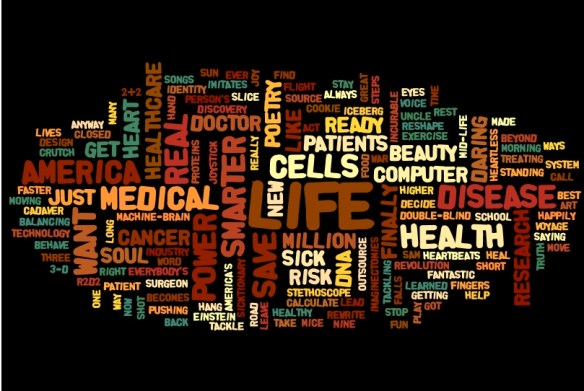
Check out this word cloud (Wordle) of the titles of the talks scheduled for TEDMEDLive 2012. This was done by Jonathan Eisen who, on his blog, lists himself as an evolutionary biologist, microbiologist & genomicist, Open Science advocate, recovering Harvard/Stanford alum, cyclist & Professor at UC Davis. Check out his blog for links to his lab page, Google Profile, and Twitter feed.

Eisen is presenting at TEDMED 2012 – the title of his talk is Who are “Me, Myself, and Us?”

February 2012 MUG Meeting Share and Show and Tell

We had a great turnout for February’s MUG meeting. The informality was great and several people shared favorite apps, did a spontaneous show and tell of some of their favorite apps, and responded to audience questions. We think we captured most of the discussion below but if you’ve got things to add, leave a comment!

Apps discussed

  • Gray’s Anatomy [$79.99] Jon Rose uses this in Physical Therapy classes.
  • 3D4Medical check out the NOVA Series with various individual apps ranging in price from $9.99 to $19.99 including: muscle system, skeletal system, heart, brain, iMuscle, knee, hip, and shoulder. For an example of one of the apps, check Muscle System Pro III for $19.99  – the Student Muscle System app is $5.99; there are a variety of other quiz and student apps, some of which are free or very inexpensive ($1.99, $2.99, $4.99). Jon Rose uses this in Physical Therapy classes.
  • WritePad  [$1.99] says it’s a “state-of-the-art handwriting recognition software [that] will adapt and learn your style of writing.” Easily transfer files. Steve Nace from Medicine uses this one.
  • FormConnect [$9.99] allows you to create database forms on the iPad, from scratch or using pre-built templates, and you can fill out forms on the iPad, save data, and share with others. Steve Nace in Medicine used this one some time ago, but hasn’t used it recently.
  • ShowMe Interactive Whiteboard [free] allows you to record voice-over whiteboard tutorials and share them online. Steve Nace in Medicine commented that he has used this to show one or two students something and record the impromptu session to share with others.
  • Sling Note [$2.99] was described by Steve Nace of Medicine as a good app for letting you take notes and browse the web to include clips of material from the web alongside/within your notes. He commented that it was good to use in classes – while a lecturer spoke about a topic he could take notes and also access material on the web to include as clippings with the notes.
  • MyPoint PowerPoint Remote [free] is a way to use your iPad to control a PPT presentation from a podium computer (PC or Mac). Trevor Sweatman of Medicine uses this and likes it because it allows you to roam about and not be tied to behind the podium while you present. There are in-app purchases that allow you to have a timer and a marker – Trevor has purchased the marker feature. It shows you the previous, current, and upcoming slide on your iPad. The download to the podium computer to allow MyPoint PowerPoint Remote to work is free.
  • MagicalPad [$4.99] is an outliner, mind mapping, notes, and checklist program all in one. Bob Shreve of Medicine and Cindy Russell of Academic Affairs use this – Bob more consistently than Cindy. Bob has pre-populated meeting agendas and also a to do list in his. Cindy finds that using it to take notes during meetings can force brevity and, when you send the notes to people, you can send as a text format as well as a PDF that shows the actual colored page.
  • Evernote [free] continues to come up at most of these MUG meetings and, given that it’s free, it’s definitely a worthwhile app to explore – Steve Nace of Medicine uses Evernote a lot and has found that Evernote and Dropbox has allowed him to do away with his use of GoodReader as well as OneNote. It allows you to sync notes across a variety of devices (mobile as well as desktop). Your notes are searchable. Lots of good features for free and some additional features in a paid premium version.
  • Dropboxis another one of those apps that continues to come up at MUG meetings. It’s a free app and allows you to sync your photos, documents, and videos. Dropbox is integrated into many other apps, which allows for seamless uploading of documents into Dropbox – then they can be accessed via any other mobile or desktop device that has the free Dropbox program installed.
    • Note: Connie Childs of International Affairs reported that Dropbox is giving up to 5GB of extra space for free to users. Read more about it here  – after the MUG meeting Connie was testing the process for herself!
    • OnLive Windows Desktop for iPad is a free service that allows you to connect to a remote virtual machine for accessing Microsoft Office Products (Word, Excel, PowerPoint). Darnita Brasselof Human Resources said that her husband has this app and he loves it.
      • Note: Lin Wu of the Health Sciences Library and Trevor Sweatman of Medicine spoke of OnLive Desktop Plus that offers access to a version of Internet Explorer with both Flash and PDF support through connection to a virtual desktop. Access costs $5/month.

Some apps that keep people up to date on what’s coming up, what’s free, and what’s hot in terms of apps and mobile devices include:

  • Macworld Express [free] is one of Trevor Sweatman’s favorite apps to stay in the know.
  • AppAdvice [$1.99] is one of Cindy Russell’s daily reads to stay on top of things.
  • Macworld [free] is another daily reader that covers Apple-related news, reviews, and tips.
  • App Hits [free]  shows apps by category, device (iPad, iPhone), and cost (paid, free) that are on sale, new, free, or just “hot.”

Some other apps discussed during the session included:

  • Adobe Photoshop Touch [$9.99] is a new release in the app store. It allows use of many popular Photoshop features, searching and sharing of images, printing, etc..
  • Slide to Buy ~ Grocery Shopping List [free for a “very short time only”] puts reminder messages on your lock screen. You can make shopping or to-do lists and check them off from either inside the app or from your lock screen.

Other items discussed included:

  • Information from ITS as to the unique clients logged into the UTHSC Mobile network show that 67% are Apple devices of some type. The next highest (other than unknown at 21%) was HTC at 2% and Motorola at 2%. ITS is getting an upgrade to one of its systems that will show more details about devices connecting to our Mobile network – but these were some interesting results.
  • Through the underwriting of the AAMC, UTHSC is receiving a live simulcast of TEDMEDLive 2012 that takes place April 10-13 with 50 speakers over 11 sessions. Individuals apply, 1200 are selected, and each pays $5,000 to attend in person. Each presenter has 15-18 minutes to engage participants in exploring issues, challenges, and innovations that shape the future of health and medicine. Several of the prior TEDMED talks are available here. Presenters are from diverse fields, many not health care-related. One of the founders of TEDMED likens TEDMED to Cirque du Soleil – saying that TEDMED is an intellectual circus not like any other. This brief 2 minute video introduces TEDMED.

There was a little something for everyone who attended. We hope this listing offers you something helpful.

Cirque Du Soleil "O"

Image attribution: Image entitled “Cirque Du Soleil ‘O'” by Adria Richards, taken on Sept. 18, 2009 and obtained from flickr at http://www.flickr.com/photos/adriarichards/3933525114/ under a Creative Commons Attribution-ShareAlike 2.0 Generic license.

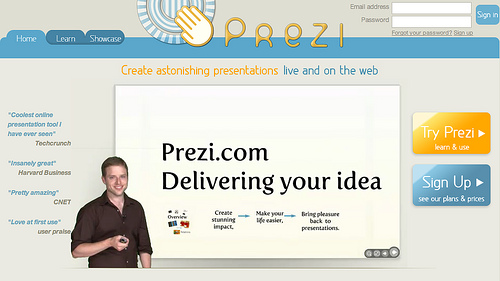
Interested in a new way of PREZInting?

NOTE: Plan to attend the Intro to Prezi session scheduled for Monday, Feb. 13, 2012, from 2-3pm in GEB A302. You’ll hear from Constance Tucker, Educational Coordinator in Student Academic Support Services, Richard Magid, Vice President of the University of Tennessee Research Foundation, and Paul Stumpf, Professor, Program Director & Chair of Obstetrics & Gynecology at Chattanooga, about their use of Prezi. They’ll do a show and tell of what they’ve done, what worked well, what didn’t work as well as hoped for, and their recommendations for use.

When used correctly, PowerPoint can be a fine addition to a presentation. Most of us, though, have experienced Death by PowerPoint. This is a painful and annoying experience!

Enter a relatively new Web 2.0 tool that’s a cross between slides and a whiteboard: Prezi.

Prezi aims to make sharing ideas more interesting. Curiosity is a goal. That could be a very positive thing!

Features of Prezi include:

  • it’s free – some features require licensing, but educators can get a lot for free
  • pan and zoom that allows zooming in/out
  • non-linear navigation within the presentation – not tied to a specific slide sequence
  • can handle text, images, videos
  • create on the web and export for off-line viewing (Pro version allows for off-line creation as well)
  • facilitates showing relation and context

But, is Prezi really useful for doing anything but fancy zooms and offering people the opportunity to skip around in a presentation? Here’s a recent blog post that illustrates the use of Prezi in conveying mathematical ideas and describes some principles for the use of Prezi.

Prezi examples you might find of interest:

Some detailed “how to” sites to get you up and running on Prezi a bit faster with less frustration – from various sources.

When you are welcomed to Prezi after subscribing, their introductory email has lots of great resources, including learning how to make a great Prezi by the company’s co-founder; exploring what other Prezi users are making; support manual; and support channels.

Prezi offers a free webinar every Thursday at 11am CST. Register here to receive details.

Prezi U is Prezi’s educational community. Join that community to learn and share best practices using Prezi in education, meet other educators, see top University Prezis and more.

Other links of interest:

Make plans to join colleagues on Monday, Feb. 13, 2012 from 2-3pm in GEB A302 for an Introduction to Prezi session that will increase your knowledge about Prezi and help you make an informed decision as to using Prezi in your future PREZIntations!
Image Attribution: Image from flickr, uploaded by Edd Dumbill with a Creative Commons Attribution-NonCommercial-ShareAlike 2.0 Generic license. Downloaded by Cynthia Russell on 20120208.

Respondus Test Bank Network

UTHSC has a license for Respondus, Respondus LockDown Browser, StudyMate and StudyMate Class. Click on any of the links to learn more about these products.

We have several monthly sessions scheduled for you to learn more about these products in case you don’t know about them or how to use them.

  • Tuesday, Jan. 17th, 2012: 2:00 p.m. – 3:30 p.m., GEB B107
  • Wednesday, Feb. 15th, 2012: 2:00 p.m. – 3:30 p.m, GEB B107
  • Tuesday, March 6th, 2012: 10:00 a.m. – 11:30 a.m., GEB B107
  • Tuesday, April 3rd, 2012: 2:00 p.m. – 3:30 p.m., GEB B107
  • Wednesday, May 9th, 2012: 2:00 p.m. – 3:30 p.m., GEB B107
  • Wednesday, June 13th, 2012: 2:00 p.m. – 3:30 p.m., GEB B107

Great news! You have access to the Respondus Test Bank Network that includes 25 publishers, 4,000 official test banks, and over 8 million questions! The test banks are in a ready-to-use format for Respondus 4.0 and StudyMate users. There is no additional charge to use the test bank network – it’s free for instructors who adopt a participating textbook for their class.

If you go to the Respondus Test Bank Network, you can do a search for publisher test banks. You’re able to search on:

  • Textbook title
  • Author’s last name
  • Keywords (discipline, course name, etc.)
  • Publisher

Head over and try it. If you find something that you’d like to access, you’ll submit a request to access the file (to make sure you’re a faculty member and not a student!) and then be able to download the test file to use as you’d like in your courses. It integrates easily with Blackboard … so let us help you try it!