Assessing Your Assessment Strategy

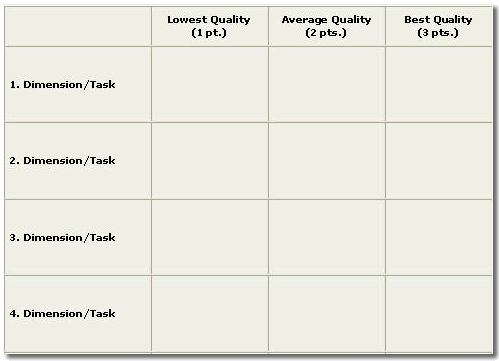
We announced back in January  that 2014 would be The Year of Active Learning at UTHSC. In our weekly posts since the beginning of the year, we have shared several resources and ideas for incorporating active learning into the classes you teach whether it be face-to-face, hybrid, or fully online. As educators, we understand that any activity or project utilized within a course must tie into the overall course objectives and to student learning outcomes. But how can we ensure (and provide evidence) that each assignment, activity, or project leads to appropriate student learning outcomes and is properly aligned to the course objectives? Many instructors utilize rubrics as part of their assessment strategy.

Rubrics are valuable tools that assist instructors in not only assessing student learning outcomes but can also help in assessing the quality of a course as a whole. There are many resources available to help in designing rubrics including templates based on the item being assessed such as rubrics for assessing oral presentations, online discussion forums, or research projects. To see an example of assessment resources that can be located online, check out The University of Wisconsin – Stout’s Rubrics for Assessment page at http://www.uwstout.edu/soe/profdev/rubrics.cfm.

Are you interested in learning more about incorporating rubrics as part of your assessment strategy? Join us July 9th (12:00 PM – 1:00 PM) in GEB A304 for a webinar led by Dr. Teresa Flateby, Director of Academic Assessment at Georgia Southern University. Dr. Flateby’s session will include a wealth of information and resources related to assessment and rubrics including templates you can utilize to design rubrics for your course.To read an overview of this session and learn more about Dr. Flateby go to http://www.higheredhero.com/3GD/0/2/pF7YE7c/pA7HJ8HZi/p0e/.

Interested in joining us and viewing this webinar? Please register at: http://tinyurl.com/creatingrubrics
 

rubric_basic


Image obtained from http://health.usf.edu/publichealth/eta/rubric_tutorial/default.htm

VoiceThread: Using More Than Text in Online Discussions

We’ve spent some time in previous posts talking about online discussion forums and their use as an active learning tool. In this week’s post, we’re going to focus on a specific tool that you can use to add an additional level of interactivity to your online discussions.

VoiceThread is a cloud-based application that is accessible via computer or mobile device. VoiceThread allows users to participate in an online class discussion via multiple options such as submitting comments or replies by microphone, webcam, text, phone, or audio-file upload. 

Several educators, including Michelle Pacansky-Brock,  are finding VoiceThread to be a valuable resource to utilize in facilitating online discussions. Michelle has received a Sloan-C Excellence in Online Teaching Award and was honored with a Sloan-C Effective Practice Award for her use of VoiceThread to enhance online community and increase social presence. To learn more about how she has used VoiceThread in her classes visit the VoiceThread blog at http://blog.voicethread.com/webinars-all/.

Screen Shot 2014-06-06 at 2.20.54 PM

Chatter in the Classroom

As educators, we often find ourselves searching for effective methods to help engage our students while teaching or leading class discussions. However, we often find that we hear from the same students when posing a question to the class or attempting to engage students in discussing a topic. What about the shy or less vocal students? How can we include the students who are hesitant to speak up, ask a question, or participate in class discussions?

Some instructors are incorporating the use of a backchannel during lecture or class discussions in order to give every student the opportunity to have a voice. What is a backchannel? EDUCAUSE (in their ELI publication – 7 Things You Should Know About Backchannel Communication) defines a backchannel as a a secondary conversation that takes place at the same time as a conference session, lecture, or instructor-led learning activity. Most educators agree that secondary conversations taking place during lecture or other class activities are typically frowned upon and can be a distraction to others. However, technology is providing new ways for backchannel or secondary communications to take place. 

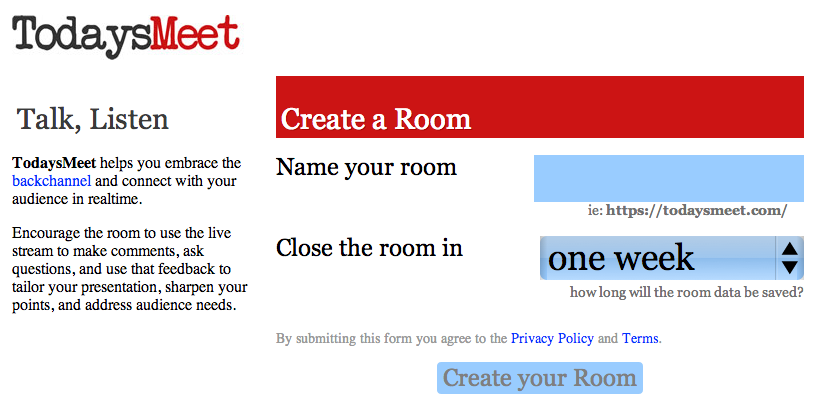
Tools, such as Today’s Meet, make it possible for instructors to create virtual chat or backchannel areas that students can use during class to ask questions or contribute their thoughts on the topic being presented. Instructors can assign specific students to monitor the chat area. At designated times during the class meeting, the student monitors can pass along questions or thoughts to the instructor that have been posted to the chat/backchannel area. This gives all students a chance to participate in the class discussion. It also provides a documented log of questions and thoughts shared during class that instructors can review afterwards and provide necessary responses or feedback for to students. The documented conversation also allows instructors to pinpoint specific topics presented during class that students might have struggled with in comprehending.

What are your thoughts on implementing backchannel communications as part of your classroom? Have you tried this strategy? Share your thoughts in the comments section below.


Screen Shot 2014-05-27 at 11.05.28 AM

Digital Badges: A New Way to Promote Active Learning

In several of our blog posts this year, we have talked about ways to encourage active learning in face-to-face, hybrid, and online courses. We have shared several strategies to use within the classroom environment. But what about a strategy that will stretch beyond the classroom and help students build their digital resume or portfolio? Digital badges can help!

Digital badges continue to capture the interest of educators as another strategy to promote active learning and student engagement. What are badges? EDUCAUSE (in their ELI publication – 7 Things You Should Know About Badges) described badges as visual representations of an achievement or skill that appear as a logo or icon on a webpage or other online venue. Badges can reflect a number of milestones or accomplishments including specific competencies attained, projects completed, or awards won. 

Many believe that badges have the potential to be an effective active learning strategy that can motivate students as well as provide detailed evidence related to their specific accomplishments. What are your thoughts on using digital badges as an active learning strategy? Have you implemented or considered implementing badges as part of the courses you teach?

To learn more about digital badges and how they are being used in education check out the following resources:

A Future Full of Badges

http://chronicle.com/article/A-Future-Full-of-Badges/131455/

Using Badges in the Classroom to Motivate Learning

http://www.facultyfocus.com/articles/teaching-with-technology-articles/using-badges-classroom-motivate-learning/

Badging from Within

http://www.insidehighered.com/news/2014/01/03/uc-daviss-groundbreaking-digital-badge-system-new-sustainable-agriculture-program#sthash.dfIgeBOu.dpbs

How Badges Really Work in Higher Education

http://campustechnology.com/Articles/2013/06/20/How-Badges-Really-Work-in-Higher-Education.aspx?Page=3

badge


Image obtained from https://credlyapp.s3.amazonaws.com/badges/70058c1694e46bdc5f0990818152acc6_15.png

Twitter 101: What is it, and what can I do with it?

Links and Resources for May 16, 2014 Twitter 101 Session

Twitter and PLN Resources:

Using Twitter in Health Science Education:

twitter-bird


Image obtained from: http://pixabay.com/es/twitter-tweet-ave-gracioso-lindo-117595/

Handing Over the Teaching Reins

In a recent blog post written for the Magna Publications Teaching and Learning blog, Dr. John Orlando shared an active learning strategy he has incorporated into his Medical Ethics course. Dr. Orlando states in the first sentence of his post, “It’s been said that teaching is the best way to learn, and I believe it.” He goes on to share why and how he hands over the teaching reins to his students through a semester long project that requires student teams to create a digital learning module that focuses on an assigned medial ethics issue. At the end of the semester, students are assigned a module from another team to assess and also present a short overview of their modules to the class.

Dr. Orlando believes that producing the digital teaching modules leads students to truly understand the material in a way that allows them to synthesize the material into organized, meaningful content that can be shared with others. Students learn how to communicate information in new ways past the traditional research paper or PowerPoint presentation and also hone their collaboration and team work skills. 

Have you considered turning over the teaching reins to your students through a project or presentation?

Reins


Image obtained from: http://www.flickr.com/photos/rknickme/4209942224/

Fueling Your Professional Growth Through Social Media

In last week’s blog post, we focused on the use of social media as a teaching and learning tool. We specifically discussed how social media can be used to enhance online course discussions by keeping the conversation going outside of the classroom environment and by inviting others such as subject matter experts and practicing professionals to join the discussion. Other than adding to the conversation by sharing additional resources and real world examples of things taking place in the specific area of study or field of practice, what other benefits exist to allowing outside participants the opportunity to participate in online course discussions?

Creating and growing a personal learning network (PLN) is another benefit to inviting outside participants into your classroom. A PLN is a network of professionals who have conversations and share resources regarding their specific field. PLNs can include colleagues who work down the hall from you or on the other side of the globe. By connecting to others within their field, students are beginning to create their own personal learning network (PLN) and faculty remain current on happenings in their field by reviewing and sharing resources with colleagues. Free web-based tools such as Twitter, Facebook, Google+, LinkedIn, blogs, and wikis have made it easier to grow, stay connected, and contribute to your PLN.

Could social media be the fuel needed to start and continue to grow a PLN? Interested in learning more about PLNs and how they can be of value to both you and your students? Check out some of the resources below and learn how other professionals utilize social media to enhance their PLNs.

Doctors Use Social Media for Continuous Medical Education

10 Ways Twitter Makes Me a Better Educator

Social Media Vital to Professional Development

The Social Media Guide to Growing Your Personal Learning Network

10 Simple Ways to Build Your Personal Learning Network

Teacher’s Using Twitter as a Virtual PLN


fuel_icon


Image obtained from http://openclipart.org/image/300px/svg_to_png/170346/eco_green_fuel_icon.png

Let’s Take This Outside the Classroom

A few of our recent blog posts have focused on utilizing discussion forums as an active learning strategy within the hybrid or online classroom setting. We’ve reviewed some examples of how well constructed discussion questions can help to facilitate engaged and purposeful discussion among instructors and students in these courses. However, should discussion forums be limited to only faculty and students? Could these discussions be enhanced by allowing subject matter experts and those currently working or practicing in the specific field of study to participate?

A large majority of online discussion forums are held within a course management system such as Blackboard or Moodle. Thus, access to course discussions is limited to the participants who have current access to a course. Is it possible to move these discussions outside of the classroom and include participants from around the world? How about having the ability to continue the conversation past the end of the course or academic term? 

One option to move the conversation outside of the course management system that most hybrid or online courses are housed within is to utilize a social media tool such as Twitter or Facebook. With Twitter, hashtags can be created which help those who are following certain topics to keep up with the ongoing conversation. Of course, Twitter limits each tweet to 140 characters which can be a challenge at times when sharing ideas or resources. Facebook allows the creation of a page dedicated specifically to a topic (or in this case a course) and allows longer posts to be submitted. With each of these social media tools, the outside world can be allowed in to participate in class discussions. 

There are numerous experts from fields such as education, nursing, medicine, etc. who share information and resources daily related to their field of expertise via social media. Social media is a great way to open the door to the virtual classroom and invite folks in for a chat!

Interested in other ways to use Facebook and Twitter in the classroom?
28 Simple Ways to Use Twitter in the Classroom posted by the te@chthought blog that includes some ideas that can be incorporated into the HigherEd classroom
Using Facebook and Tumblr to Engage Students posted by ProfHacker in The Chronicle of Higher Education

social_media_icons


Image obtained from http://hazzbrogaming.deviantart.com/art/15-Free-Social-Media-Icons-427513982

From Passive Content Consumers to Active Learners

Multimedia course content, such as podcasts, narrated PowerPoint presentations, and videos, are playing a larger role in today’s educational environment. Multimedia content is also a great way to enhance active learning strategies within the hybrid or fully online class setting. However, watching a video or listening to an audio clip doesn’t always mean that learning has occurred.

In an article written for Faculty FocusEmily Moore provides suggestions to help increase the effectiveness of multimedia utilized as part of course content including the use of multimedia as a:

  • Guided lesson
  • Springboard for in-depth discussion
  • Springboard for critical thinking
  • Way to strengthen online research skills while driving conceptual understanding

Are you using multimedia as part of your course content? Has it helped to enhance active learning within your classes? Share your experiences and best practices in the comments section below.


playbutton


Image from: OpenClipArt (http://openclipart.org/detail/170476/play-button-by-diamonjohn-170476)

Tips and Advice for Productive Online Discussions

We have focused on the use of online discussion forums in some of our recent blog posts. We began by discussing the use of online forums as an active learning strategy in online/hybrid courses. We followed up with a couple of posts that focused on striking the right balance of instructor participation within online course activities and ways of engaging students in these activities…particularly within online discussion forums. 

How engaged are students in your online or hybrid course discussion forums? Would some recommendations and tips from experienced online educators help to further enhance the value of online discussions in your course? Wiley Faculty Network recently hosted a webinar (Discussion Board Best Practices) in which several resources and recommendations were shared. Experienced online instructor, DeAnna Kirchen, shared tips and best practices for teaching online including specific strategies for effectively incorporating discussion forums including creating groups, grading/rubrics, and setting expectations.

Do you have any tips or suggestions for enhancing online discussion forums? Please share your thoughts or experiences in the comments section below.

online


Image from: https://flic.kr/p/bvwXaM